

If you're creating an online course, giving your students a professional certificate at the end can really make a difference. It helps them feel proud of what they've learned and shows others that they've completed something meaningful. In this guide, you'll learn how to make course certificates that look professional, even if you're not a designer.
We'll walk you through what to include in a certificate, which tools to use to design one, and how to send them to students automatically. You'll also see how platforms like Mini Lessons Academy make the whole process faster and easier. Whether you're just starting out or improving your course, these best practices will help you build stronger trust with your students and leave a lasting impression.
Why Course Certificates Matter (Even for Small Creators)
Certificates may seem like a small thing, but they can add real value to your online course. Whether you're teaching a full program or just a short lesson, giving a certificate at the end helps your learners feel like they’ve completed something meaningful. It gives them a clear moment of “I did it,” which is powerful — especially in online learning, where people can easily drop out or feel lost.
When someone finishes your course and gets a certificate, it gives them something they can show to others. It might not be a university degree, but it’s still proof that they put in the effort and gained new skills or knowledge. Some learners even add these certificates to their LinkedIn profiles, CVs, or personal portfolios. That small PDF can make them feel proud — and help them stand out.
For course creators, certificates also help your brand. They make your course feel more complete and professional. People trust your content more when there’s a sense of structure and recognition. Even if you’re a small creator or just starting out, offering a certificate tells people: “I take this seriously, and I respect your time and learning.”
Certificates can also improve student engagement. When learners know they’ll receive a certificate at the end, they’re more likely to stick around and finish the course. It gives them a clear goal to work toward. This is especially true for free or low-cost courses — the certificate adds a layer of value that encourages people to complete the full journey.
You don’t have to be an expert in design or tech to offer certificates. Platforms like Mini Lessons Academy (MLA) make it easier by helping you build courses and automatically send certificates when someone finishes. Even if you’re doing everything manually, you can still create a simple certificate using tools like Canva, Google Slides, or Word. The important thing is not how fancy it looks — it’s that it’s clear, thoughtful, and easy to deliver.
In short, certificates are more than just a piece of paper. They give learners a sense of accomplishment. They help build your reputation. And they make your course feel like a complete learning experience, not just a set of videos or lessons. Whether you’re just starting out or already have students, it’s worth taking the time to include a certificate at the end of your course.
This is an example box to feature another article with a button
When you're giving someone a certificate, you want it to feel real and respectful. That doesn't mean it has to be fancy or overly designed. It just means it should look complete, clean, and clear. A professional-looking certificate shows that you took time to recognize the learner's effort. It can also make your course feel more polished overall.
What Makes a Certificate Look Professional
When you’re giving someone a certificate, you want it to feel real and respectful. That doesn’t mean it has to be fancy or overly designed. It just means it should look complete, clean, and clear. A professional-looking certificate shows that you took time to recognize the learner’s effort. It can also make your course feel more polished overall.
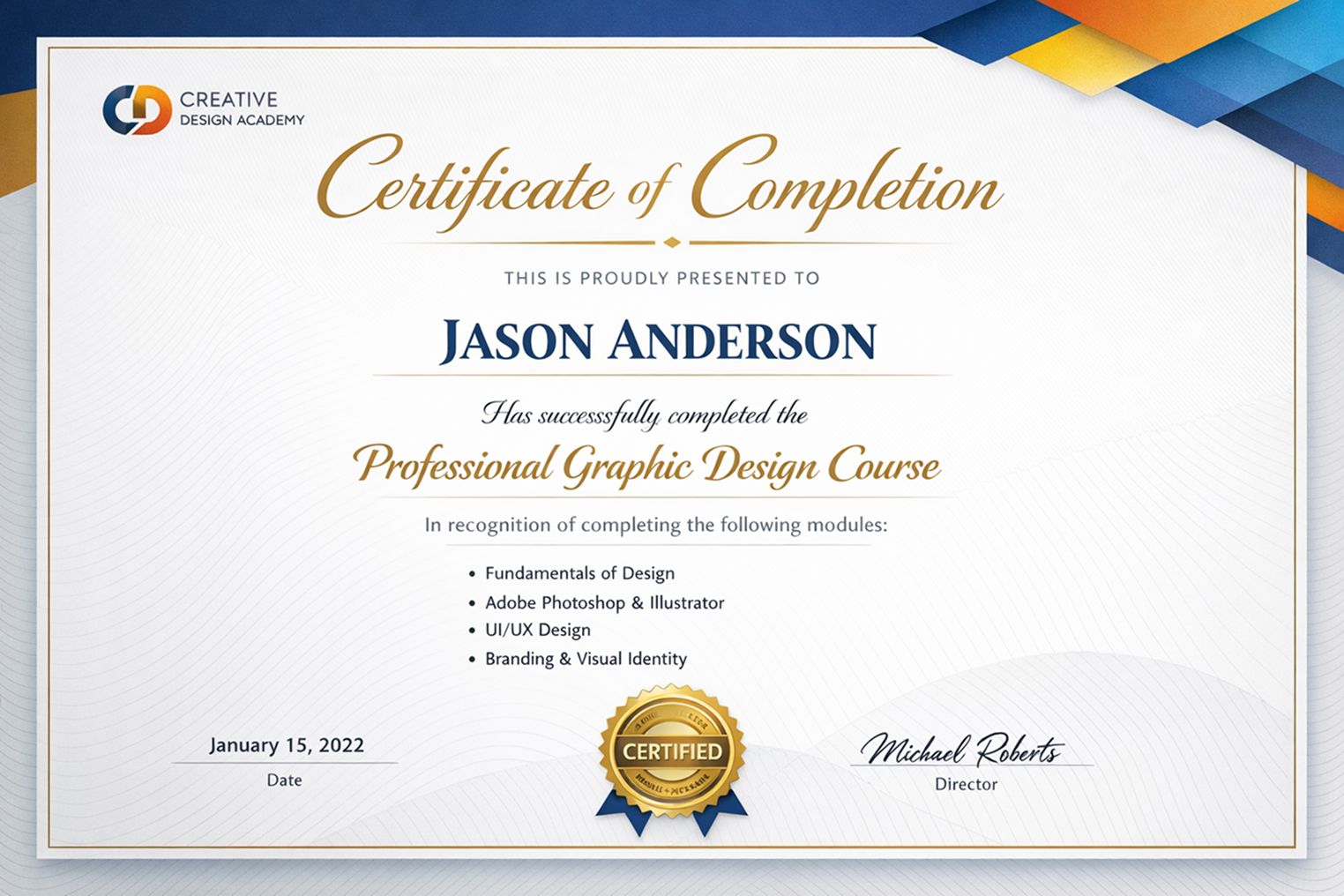
Let’s start with what every certificate needs. The most important part is the learner’s name. Make sure it’s written clearly and spelled correctly. Right under or near the name, you should include the name of the course they completed. That way, it’s clear what the certificate is for. You’ll also want to add the date they finished the course. This gives it a time stamp and makes it more official.
Next, there should be something that shows who the certificate is from. That could be your name as the instructor, your company name, or your course brand. Adding a signature or a logo makes it feel more personal and trustworthy. Some people also include a short sentence like, “This certificate is awarded to [Name] for successfully completing the [Course Name] course.” It doesn’t need to be complicated — just enough to explain what the certificate is about.
Design matters too, but you don’t have to be a graphic designer. Just keep it clean. Use a simple font, make sure the text is easy to read, and try not to overload it with colors or decorations. If you have a brand color or logo, it’s a good idea to use them. That way, the certificate matches the style of your course or platform. Tools like Canva or even Google Docs can help you make something that looks nice and clear.
Some platforms make this even easier. For example, Mini Lessons Academy (MLA) lets course creators use templates and automate certificate delivery. That means the certificate gets sent to the learner as soon as they finish the course, without you having to do it manually. This kind of feature saves time and also keeps everything consistent.
One more thing to consider: does the course include any kind of final task or assessment? If it does, you can add a line saying the learner passed or completed all requirements. That can make the certificate feel stronger, especially for people who want to use it on their resume or LinkedIn profile.
To sum it up, a good certificate includes the learner’s name, course name, completion date, and your signature or logo. Keep it clean and readable. Use kind, respectful wording. And most of all, make sure it feels real — like something the student can be proud of.
How to Design a Certificate That Looks Professional
You don’t need to be a designer to create a certificate that feels professional. What matters most is that it’s clear, clean, and communicates the right message. A good certificate should look like it means something — even if it’s made using basic tools.
Start with the essentials. Every certificate should clearly show:
- The name of the student
- The course or program title
- A statement like “has successfully completed” or “has participated in”
- The date of completion
- Your name (or the instructor’s name) and signature
- The name or logo of your brand or course platform
You can also include optional details like the number of hours or modules completed, a unique certificate ID, or a QR code that links back to your course or student dashboard. But don’t overcomplicate it. Keep it simple and readable.
Design-wise, stick with easy-to-read fonts and leave plenty of space. A common mistake is trying to fill every inch of the page, but the best-looking certificates often have a lot of white space. That makes them feel more official and easier to read. If you’re using tools like Canva or Google Slides, they offer ready-made certificate templates you can tweak — just change the colors, text, and logo to match your brand.
Make sure your brand is clear but not overpowering. Use your logo in a corner, and choose colors that match your course platform or personal style. If you’re creating certificates by hand (without automation), export them as a PDF and email them directly to learners once they finish. This might take more time, but it still works well — especially for smaller groups.
If you’re using a tool like Mini Lessons Academy (MLA), the certificate design can be automated. You can create a basic certificate layout once, and MLA will fill in each learner’s name and course details when they complete the course. This saves time and ensures consistency across your student base.
Don’t stress about making the perfect design. What matters more is the feeling it gives. Does it look real? Would someone feel proud printing it or sharing it online? If yes, then you’ve done your job.
Lastly, remember to test your certificate before you send it out. Print it or open it on different devices to check if it looks good everywhere. Small things like alignment, font size, or blurry logos can make a big difference in how professional your certificate feels.
A thoughtful, clean, and easy-to-read certificate goes a long way. Even if you’re starting with free tools, a well-made certificate can give your course a serious boost in credibility and student satisfaction.
How to Deliver and Automate Certificates for Your Students
Once you’ve created a professional-looking certificate, the next step is delivering it to your students — and if you want to save time in the long run, setting up an automated system is the way to go. Whether you're running a small course with a few learners or a growing program with hundreds of students, having a plan for this makes everything smoother.
If you're doing things manually, you can use tools like Google Docs, Canva, or PowerPoint to insert the student’s name, course title, and date. Then export the certificate as a PDF and email it to them once they finish. This method works fine if you only have a few students, but it can get tiring fast if you’re doing this repeatedly.
That’s where automation tools can help — especially if you’re building a course you want to scale. Some platforms, like Teachable, Thinkific, and Podia, offer built-in certificate features. These tools let you design one template and automatically generate certificates when someone completes your course. You don’t need to manually enter names or dates — it all happens in the background.
But most of those tools still require you to use their pre-set layouts and workflows, which can be limiting.
If you want more flexibility and ease, Mini Lessons Academy (MLA) is a great option. MLA helps course creators, coaches, and educators design and deliver certificates effortlessly. Once your course is set up, MLA handles the rest — from filling in student names to sending out completion certificates through email or direct download. It’s especially helpful if you want your certificates to match your brand, track completions, or even include dynamic elements like QR codes or custom links.
Another simple option — if you’re using platforms like Notion, Google Forms, or even email for your course — is to connect your workflow with a tool like Zapier. For example, when a student completes a form or marks a module as done, Zapier can trigger a certificate to be generated and sent using tools like Google Slides or Certifier. This setup takes some initial effort but pays off in the long run.
The goal here isn’t just to send certificates — it’s to make the process feel seamless and rewarding for your learners. When someone finishes a course, getting their certificate instantly feels like a moment of accomplishment. If there’s a delay or the process is clunky, that moment passes and the impact is lost.
So, take a bit of time upfront to either create a smooth manual workflow or use a tool like MLA to automate it fully. A good delivery system keeps your students happy, your brand consistent, and your time freed up for more important things — like creating the next course.